



Learn computer system validation guidelines for HPLC with step-by-step CSV process, software validation, and compliance with data integrity standards.
Definition
Computer System Validation (CSV) is a documented process that ensures a computerized system consistently performs as intended, maintaining data integrity, compliance, and reliability throughout its lifecycle.
Introduction
Computer System Validation (CSV) plays a central role in pharmaceutical quality systems. It ensures that computerized systems—especially those used in analytical instruments like HPLC—operate accurately, securely, and in compliance with regulatory requirements.
Validation reduces risks, improves data integrity, and lowers long-term operational costs by minimizing errors and rework. Regulatory authorities closely monitor HPLC systems due to frequent data integrity concerns during inspections.
This guide provides a simplified yet technically accurate overview of CSV guidelines, focusing on HPLC system validation and software compliance.
Why CSV is Critical for HPLC Systems
- Ensures data accuracy and integrity
- Complies with 21 CFR Part 11 requirements
- Prevents unauthorized data manipulation
- Reduces system failures and rework costs
- Supports audit readiness and inspections
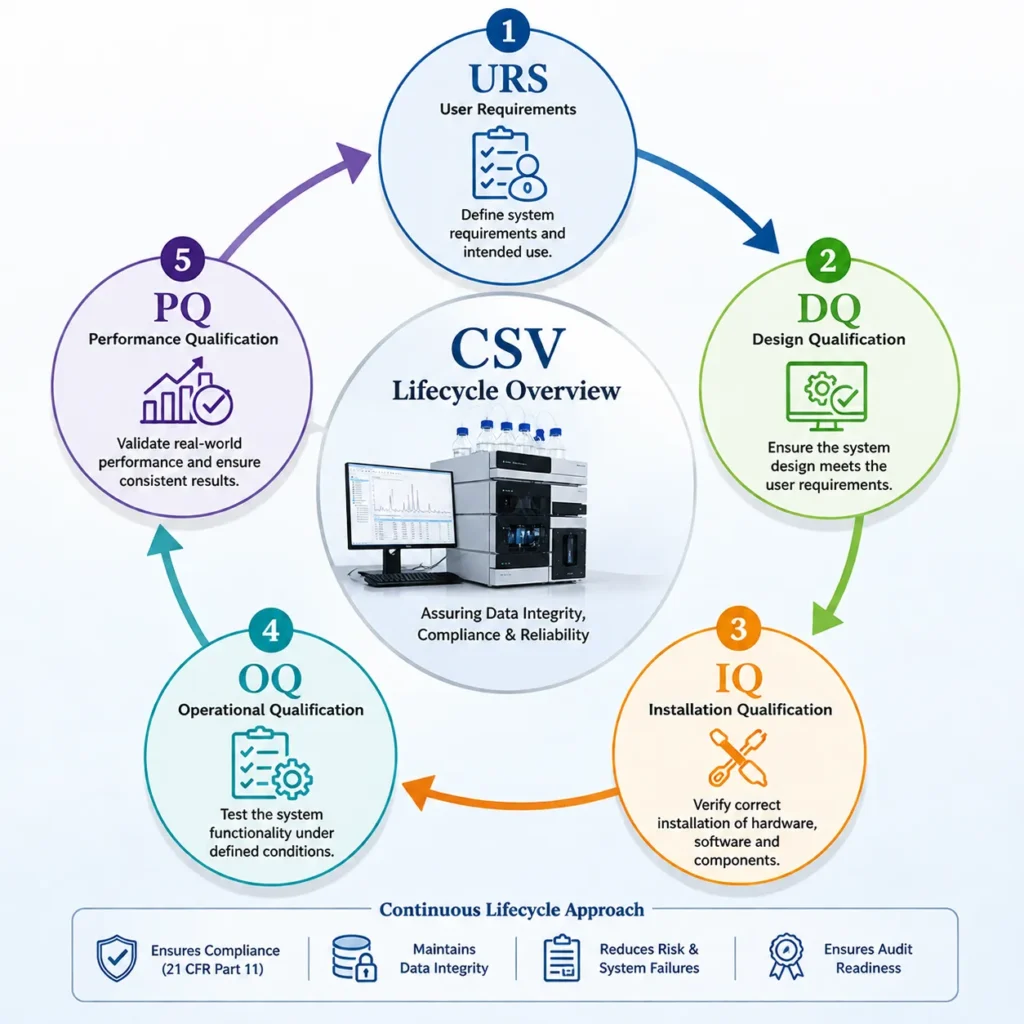
CSV Lifecycle Overview
Step-by-Step: Computer System Validation for HPLC
| Phase | Description | Objective |
|---|---|---|
| URS (User Requirement Specification) | Defines system needs and intended use | Ensure clear expectations |
| DQ (Design Qualification) | Confirms system design meets URS | Verify suitability |
| IQ (Installation Qualification) | Verifies correct installation of hardware/software | Ensure proper setup |
| OQ (Operational Qualification) | Tests system functionality under defined conditions | Confirm performance |
| PQ (Performance Qualification) | Validates real-world performance (often included in extended validation) | Ensure consistency |
Step 1: User Requirement Specification (URS)
Define all required functionalities of the HPLC system.
Key Requirements:
- Method creation (flow rate, wavelength, runtime)
- Sequence setup and execution
- Report generation with customizable formats
- Single injection capability
- User access control
- Audit trail and electronic signatures
Step 2: Design Qualification (DQ)
Ensure the system design aligns with URS.
Includes:
- Hardware verification (CPU, RAM, storage)
- Operating system compatibility
- Workstation configuration
- Instrument and software details documentation
Step 3: Installation Qualification (IQ)
Verify correct installation of system components.
Activities:
- Match system with purchase order
- Check manuals and certificates
- Install hardware and software
- Configure peripherals (printer, network)
- Document system specifications
Step 4: Operational Qualification (OQ)
A. Computer System Qualification
- Boot-up verification
- Date/time accuracy
- Disk and network checks
- Software version validation
B. Software Qualification
1. Workstation Software
- User authentication
- Password policies
- Access control
- Audit trail verification
- Login failure handling
2. Application Software
- Method creation/editing
- Sequence execution
- Data processing and reporting
- Reprocessing controls
Note: Include LAN validation where applicable to ensure data consistency across systems.
Step 5: Backup and Restore
- Perform data backup after analysis
- Delete original data
- Restore from backup
- Compare restored data with original
Step 6: Validation Report
Document:
- Observations
- Screenshots and evidence
- Deviations and corrective actions
Step 7: Training
- Train all system users
- Maintain training records
- Ensure competency in system operation
Step 8: Conclusion
Prepare a final report confirming:
- All validation steps completed
- System operates as intended
- Compliance requirements met
FAQs
1. What is computer system validation (CSV)?
CSV ensures that a computerized system consistently performs according to predefined requirements.
2. Why is CSV important for HPLC systems?
Because HPLC generates critical analytical data subject to regulatory scrutiny.
3. What is URS in CSV?
User Requirement Specification defines system needs and expected functionalities.
4. What is the difference between IQ and OQ?
IQ verifies installation; OQ verifies functionality.
5. What regulations apply to CSV?
Primarily 21 CFR Part 11 and GAMP 5 guidelines.
6. What is software validation in CSV?
Testing and verifying that software functions correctly and securely.
7. How is data integrity ensured in CSV?
Through audit trails, access controls, and validation checks.
8. What is an audit trail?
A record of system activities that ensures traceability of data changes.
9. How often should systems be validated?
Initially and after major changes or upgrades.
10. What is the final outcome of CSV?
A validated system that is compliant, reliable, and audit-ready.
{ “@context”: “https://schema.org”, “@type”: “Article”, “headline”: “Computer System Validation Guidelines for HPLC”, “description”: “Complete guide to computer system validation guidelines for HPLC including software validation and compliance steps.”, “author”: { “@type”: “Person”, “name”: “SEO Technical Writer” }, “datePublished”: “2026-04-25” } { “@context”: “https://schema.org”, “@type”: “FAQPage”, “mainEntity”: [ { “@type”: “Question”, “name”: “What is computer system validation?”, “acceptedAnswer”: { “@type”: “Answer”, “text”: “Computer system validation ensures systems perform as intended consistently.” } } ] } { “@context”: “https://schema.org”, “@type”: “HowTo”, “name”: “How to Perform Computer System Validation”, “step”: [ {“@type”: “HowToStep”,”name”: “Define URS”}, {“@type”: “HowToStep”,”name”: “Perform DQ”}, {“@type”: “HowToStep”,”name”: “Execute IQ”}, {“@type”: “HowToStep”,”name”: “Conduct OQ”} ] }